The Panopto LTI will not function within Moodle4, however you can still prepare your course for the Fall using one of the following methods.
Upload Content Directly to Panopto
1. Build your content in your course within moodle4.lsu.edu. For more information on LSU Moodle sites, see Moodle LSU Overview.
2. Provision the course in the Panopto Block. If you need assistance with this step please see the following article: Getting Started with Panopto
3. Instead of using the LTI within Moodle, you can login at lsu.hosted.panopto.com, click your course folder, and upload your content there (see Uploading Media to Panopto.) If you need assistance logging into Panopto, please see: Accessing Your Recordings in Panopto.
4. In the Fall, you will be able to add the videos to your course using the LTI.
Using the Embed Code
1. Build your course as normal in moodle4.lsu.edu. For more information on LSU Moodle sites, see Moodle LSU Overview.
2. Provision the course in the Panopto Block. If you need assistance with this step please see the following article: Getting Started with Panopto
3. Instead of using the LTI within Moodle, you can login at lsu.hosted.panopto.com, click your course folder, and upload your content there (see Uploading Media to Panopto.)
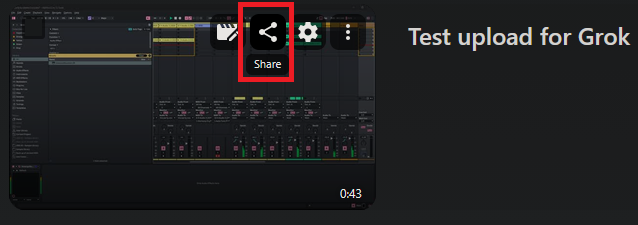
4. Hover your mouse over the video you'd like to embed, and click the Share button.
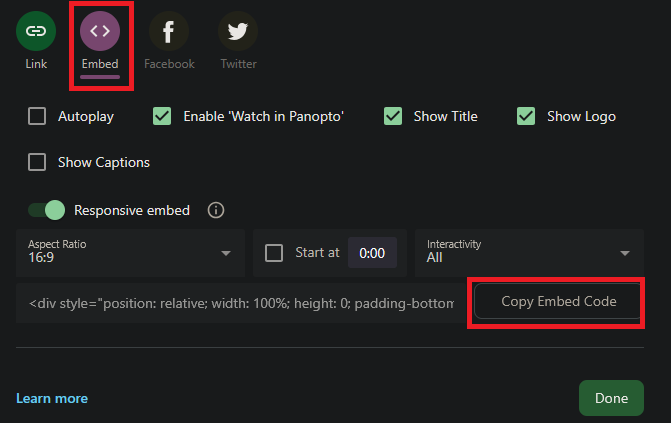
5. When the Share window opens, select Embed, customize any settings if you wish to do so, then click Copy Link.
Build Course in moodle.lsu.edu and Restore Later
1. Build your course in moodle.lsu.edu and save a backup – Moodle: How to Back Up a Course.
2. Restore the backup course in the Fall.