Moodle: Activities & Resources: Question Bank - Export Questions
You can export your question bank from a Moodle course in order to import it to another. If you would like to be able to make edits to the exported file before importing back into Moodle, we recommend using Aiken format or Microsoft Word 2010 table format.
To Export Quiz Questions in Moodle:
- Login to Moodle and select your course.
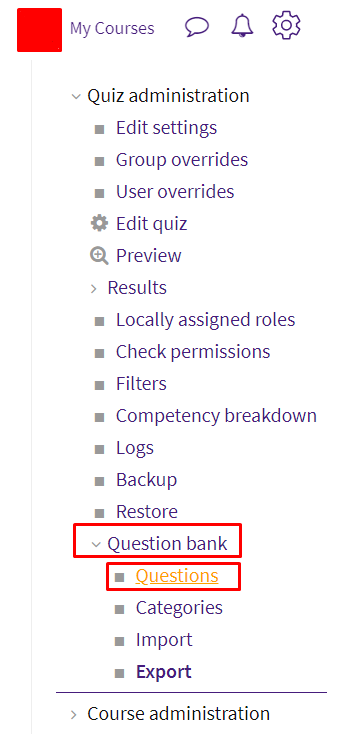
- In the upper-right corner, click on the Admin gear to open the menu. Select the Question bank tab, then select Questions.
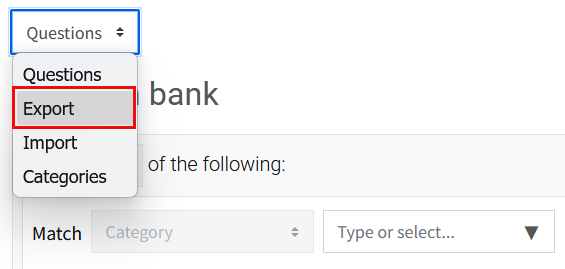
- The Question bank will open. Click on the dropdown and select Export.
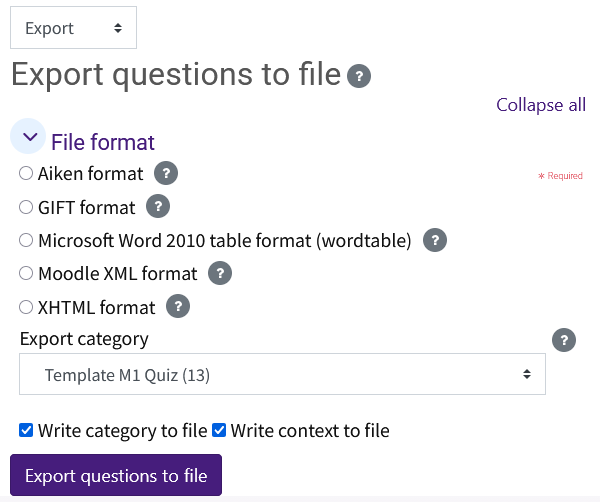
- The Export Questions to File page will open up. Under File format, the Aiken format, Gift format, Microsoft Word 2010 table format, Moodle XML format, and XHTML format options are available. To export the question bank for use in another Moodle course without edits, select Moodle XML format. Use Microsoft Word format to make edits external to Moodle. If making edits outside of Moodle, do not change the exported table formatting. View the help icons to learn more. In the Export category drop down menu, select the category of questions you wish to export. When you are done, click Export questions to file.
The export file should start to download almost immediately after clicking the Export questions to file button. The file will then be found in your browser's download folder location.
Resources
For more information on exporting questions, read the following documentation from Moodle Docs. Note that the documentation does not show the SNAP Theme, but the functionality of the settings is the same. All links will open in a new window.
20067
3/13/2026 12:46:40 PM