Moodle: Sections: How to Hide, Show, or Move Course Sections
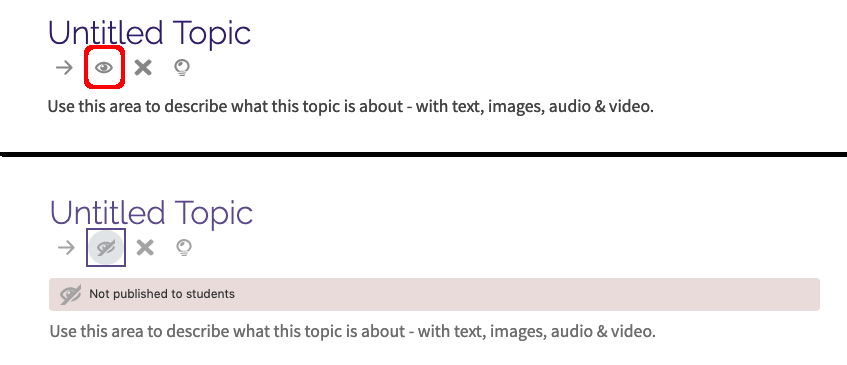
You may need to temporarily hide a section from students while you are in the process of adding or editing its contents. To hide a section, simply navigate to the offending section and click on the open eye icon located in the toolbar just below the name. This icon is a toggle control, so clicking it repeatedly unhides and re-hides the section. When the section is in its visible state, the eye appear open. When the section is in its hidden state, the eye appears closed and a message appears below the toolbar indicating that the section is "Not published to students":
If you need to rearrange the order of your sections, you can easily move a section by first clicking on the Move icon that appears as a right-pointing arrow just to the left of the Show/Hide icon. If you want to move section "Topic 10" before section "Topic 6":
- Navigate to Topic 10 and click the Move arrow to initiate the move process.
- Use the Contents sidebar to navigate to Topic 6
- There will be a link just below the Topic 6 section name to "Place section Topic 10 before section Topic 6". Click that link to complete the move.
Note: For instructions on how to create and delete course sections, please see this Moodle: How to create and delete course sections
20234
11/5/2026 7:37:39 PM