Windows Hardware: Calibrating Inkjet Printer Cartridges
This article has not been updated recently and may contain dated material.
Calibration allows you to properly align the inkjet cartridge nozzles to the paper that you are printing. Without calibration, your print quality declines. Different printers have different on-screen controls for calibration, but you should be able to access them from the printer's Properties dialog box.
Calibrating Inkjet Printer Cartridges
1. Choose Start, Printers and Faxes, and you will see the printers on your system.

2. Right-click the printer you want to calibrate and click Properties.
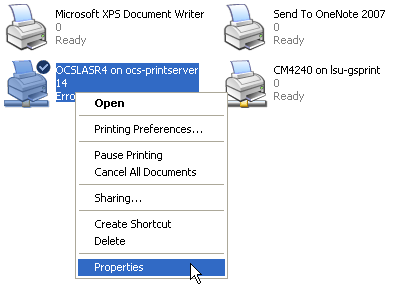
3. Locate your printer's calibration function. If it is not visible in the General tab, you may have to search for it on the Advanced tab. You can also try to click the Printing Preferences button. If all else fails, check your printer manual for the location of the calibration controls.
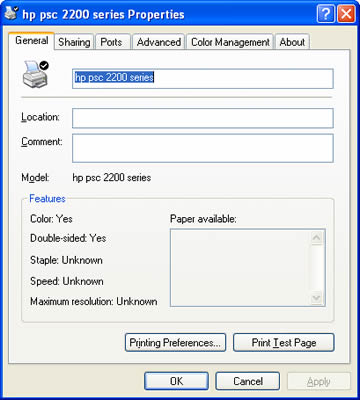
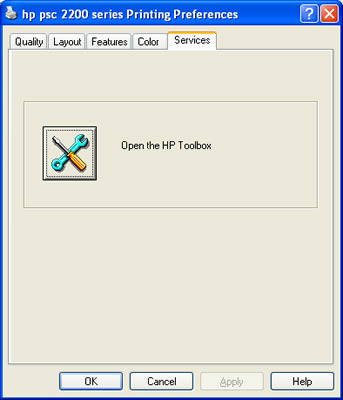
4. Run the calibration. It usually takes less than a minute and uses a single sheet of paper.
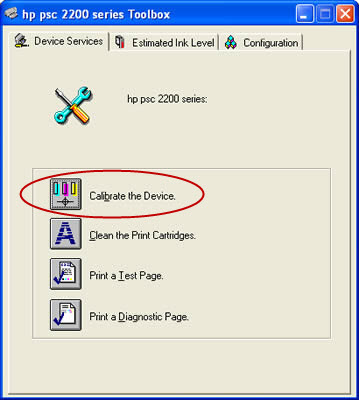
You should calibrate your printer cartridges three months after installing them or when you notice your that print quality is low.
10714
1/3/2025 1:14:33 PM